- Corporate
- Solutions
- Microsoft Solutions Overview
- Microsoft Dynamics 365 Business Central ERP Solution with Copilot Ai technology
- Microsoft Dynamics 365 – Sales (CRM)
- Microsoft Sustainability Solutions
- Microsoft Copilot Services
- Microsoft Fabric
- Microsoft Dynamics 365 Finance
- Microsoft Dynamics 365 Supply Chain Management
- Marketplace Offers
- AI Agents
- Services

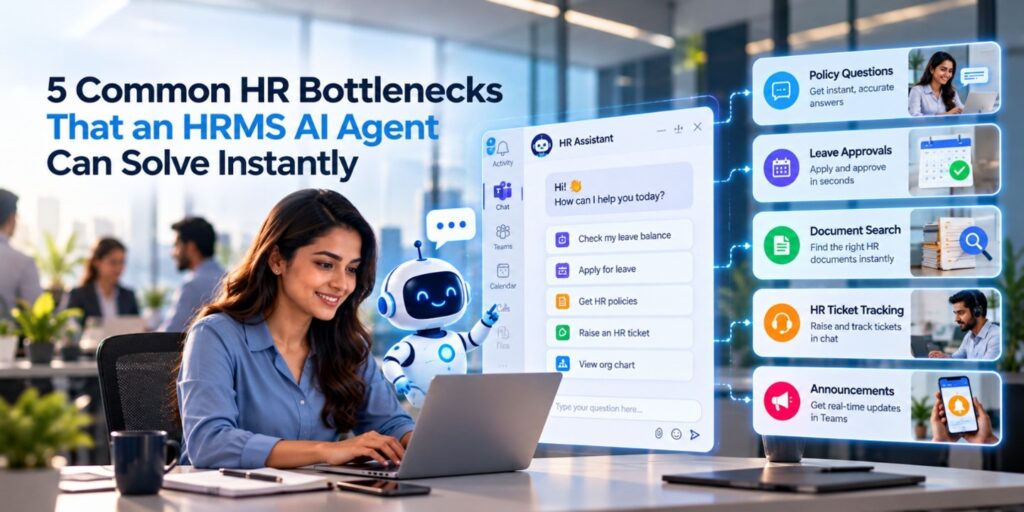
5 Common HR Bottlenecks That an HRMS AI Agent Can Solve Instantly
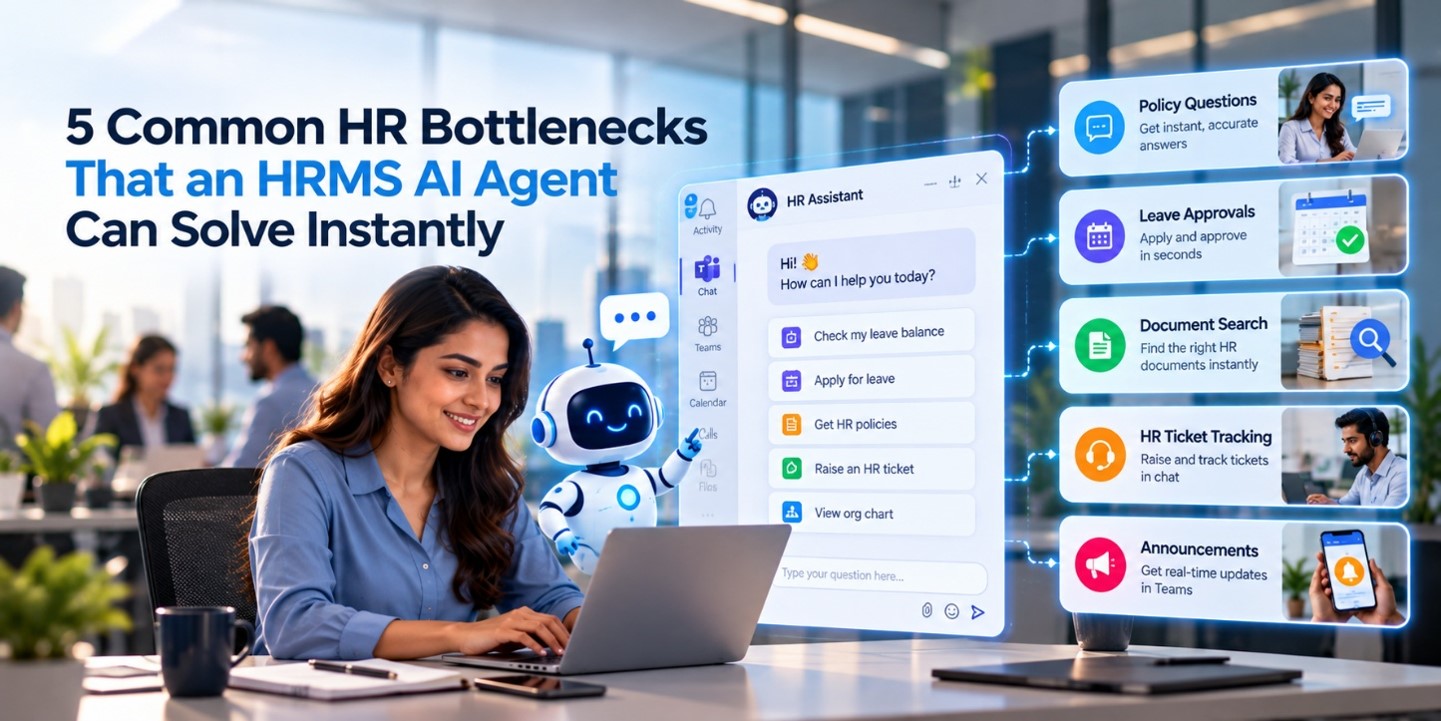
5 Common HR Bottlenecks That an HRMS AI Agent Can Solve Instantly
An HRMS AI agent clears five bottlenecks that slow most Indian HR teams: repeated policy questions, leave approvals stuck in inboxes, document hunts, untracked HR tickets, and announcements nobody sees. Employees ask in plain language, and the agent answers or acts in seconds.
Compusoft Advisors builds its HRMS AI Agent on Microsoft Copilot Studio. It runs as a standalone agent across Microsoft Teams, portals, websites, and mobile apps. No portal logins. No waiting.
Here is where it makes the biggest difference.
Bottleneck 1: The Same Ten Questions, Asked a Hundred Times
Every HR desk in India knows this pain. “How many casual leaves do I have?” “What’s the notice period?” “Where is the reimbursement policy?”
Your HR executives answer these by email, phone, and WhatsApp, all day. Skilled people spend hours repeating approved answers.
How the HRMS AI agent fixes it
Employees type a question in Teams, the way they would message a colleague. The agent replies with the approved answer, pulled from your own policy library. It doesn’t improvise.
- Answers come in natural language, not keyword searches
- Responses stay standardized, so a Pune employee and a Delhi employee get the same policy
HR stops being a helpdesk and starts being a strategy team
Bottleneck 2: Leave Requests That Die in an Inbox
A leave request sounds simple. Then it needs a form, an email to the manager, a reminder, a second reminder, and a manual balance update in the HR system.
During festival season, such as Diwali or Pongal, or at year-end, the queue grows. Managers miss mails. Employees plan trips without knowing if leave is approved.
How the HRMS AI agent fixes it
The agent handles the full leave lifecycle inside chat. An employee applies, the manager gets a Teams notification, and approval triggers an automatic update to balance and status. Power Automate runs the workflow behind the scenes.
Employees can also track, modify, or cancel a request the same way. No forms. No portals. No emails.
Managers approve from the notification itself, often between two meetings.
Bottleneck 3: Documents Nobody Can Find
Your onboarding checklist sits in one SharePoint folder. The latest leave policy hides in another. An outdated version lives in someone’s Downloads folder.
New joiners feel this most. Day one is already overwhelming, and they should not be hunting for the right PDF.
How the HRMS AI agent fixes it
The agent connects securely to Microsoft 365 and SharePoint, where your SOPs and HR documents already live. An employee types “Send me the onboarding checklist” and gets it. One request, one current version.
Role-based access control (RBAC) decides who sees what. A trainee cannot pull up a document meant for senior leadership. The agent shows employees only what they are authorized to view.
Bottleneck 4: HR Tickets That Vanish Into the Void
“I raised a salary discrepancy query two weeks ago. Any update?”
Hear that often? Without a proper case system, grievances travel by email and memory. Nobody owns them. Employees lose trust, and HR loses visibility.
How the HRMS AI agent fixes it
The agent integrates with ServiceNow for HR case management. Employees raise a ticket in chat: “Raise a ticket for salary discrepancy.” Later they ask: “Check my grievance status.”
Each case gets routed, tracked, and updated in real time. HR sees a clean queue instead of a cluttered inbox.
Bottleneck 5: Announcements That Nobody Reads
A new policy rolls out. HR sends a mail. Half the company never opens it. Two weeks later, someone breaks the policy without knowing it existed.
System maintenance alerts and feature releases suffer the same fate. Email is simply a poor channel for urgent messages.
How the HRMS AI agent fixes it
The agent pushes proactive notifications straight into Microsoft Teams, where employees already spend their workday. Policy updates, reminders, announcements, and system alerts arrive in real time.
Employees can then ask follow-up questions in the same chat. The notification and the answer live in one place.
The Five Bottlenecks at a Glance
| HR Bottleneck | The Old Way | With the HRMS AI Agent |
|---|---|---|
| Repetitive policy queries | Emails, calls, WhatsApp pings to HR | Instant, approved answers in Teams |
| Leave approvals | Forms, email chains, manual balance updates | Chat-based apply and approve, with automatic updates |
| Document search | Digging through SharePoint folders and inboxes | One request retrieves the current document |
| HR case tracking | Untracked emails, follow-up chasing | Tickets raised and tracked in chat via ServiceNow |
| Announcements | Mass emails that go unread | Real-time Teams notifications |
Bonus: Org Charts Without the Guesswork
Large companies have a quiet bottleneck of their own: nobody is sure who reports to whom. This gets worse across multiple offices, say Mumbai, Delhi, and Kolkata.
The agent handles organizational navigation too. Ask “Who does Priya report to?” or “Show the Finance department hierarchy,” and the answer appears in seconds. New joiners find the right approver without asking three people.
Who Gains What
An HRMS AI agent doesn’t only help HR. Every layer of the business feels it.
- Employees: Instant self-service across Teams, web, and mobile
- Managers: One-tap approvals and real-time visibility into team availability
- HR teams: Fewer repetitive queries, standardized policy delivery, and automated workflows
- Leadership: Better HR service efficiency, higher employee satisfaction, and governance visibility that scales
What Implementation Looks Like
You don’t need to rip out your existing systems. This is where many Indian enterprises hesitate, and where the approach matters.
Compusoft Advisors follows a structured path:
- Discovery and process mapping of your HR workflows, approvals, and policy repositories
- Knowledge and data integration with Microsoft 365 and SharePoint
- AI conversation design tailored to employee, manager, and HR journeys
- Workflow automation for leave, notifications, escalations, and case updates through Power Automate
- System and case integration with HR admin apps and ServiceNow
- Omni-channel go-live across Teams, web, mobile, and internal portals
Security stays inside Microsoft’s enterprise compliance and RBAC framework. For HR data, that matters.
Why Compusoft Advisors
Compusoft Advisors brings nearly three decades of Microsoft enterprise delivery experience. The team designs AI agents that fit real workflows, not disconnected demos. The solution slots into your existing Microsoft environment, respects your compliance rules, and scales across departments and locations.
With offices in Mumbai (Thane), Delhi, and Kolkata, the team supports businesses across India.
Put an HRMS AI Agent to Work in Your HR Team
Pick your slowest HR process. Leave approvals. Policy queries. Ticket tracking. Start there.
Talk to Our AI Solution Experts and see the HRMS AI Agent running on your own use cases.
Call +91 22 4974 5171/75 or write to info@compusoftadvisors.com. Explore the full solution at compusoftadvisors.com/hrms-ai-agent.
Recent Post
-
 10 Oct 2026Boosting Enterprise Efficiency: Integrating an AI Agent Document Analyzer Into Microsoft Teams
 -
 07 Oct 2026From Passwords to Performance: What Exactly Is an ITSM AI Agent?
 -
 05 Oct 20265 Common HR Bottlenecks That an HRMS AI Agent Can Solve Instantly
 -
 01 Oct 2026Beyond Generic AI: Building Custom Business Agents with Microsoft Copilot Studio
 -
 25 Sep 2026Driving Business Growth and Lead Qualification with AI-Powered Assistants
 -
 23 Sep 2026From Discussion to Delivery: How AI Meeting Assistants Eliminate the Post-Meeting Execution Gap
Grow Your Business Today
Aggarwal Estate, Chitalsar Manpada, S V Road, Thane 400 610
Microsoft Solution Partner
Quick Link