- Corporate
- Solutions
- Microsoft Solutions Overview
- Microsoft Dynamics 365 Business Central ERP Solution with Copilot Ai technology
- Microsoft Dynamics 365 – Sales (CRM)
- Microsoft Sustainability Solutions
- Microsoft Copilot Services
- Microsoft Fabric
- Microsoft Dynamics 365 Finance
- Microsoft Dynamics 365 Supply Chain Management
- Marketplace Offers
- AI Agents
- Services

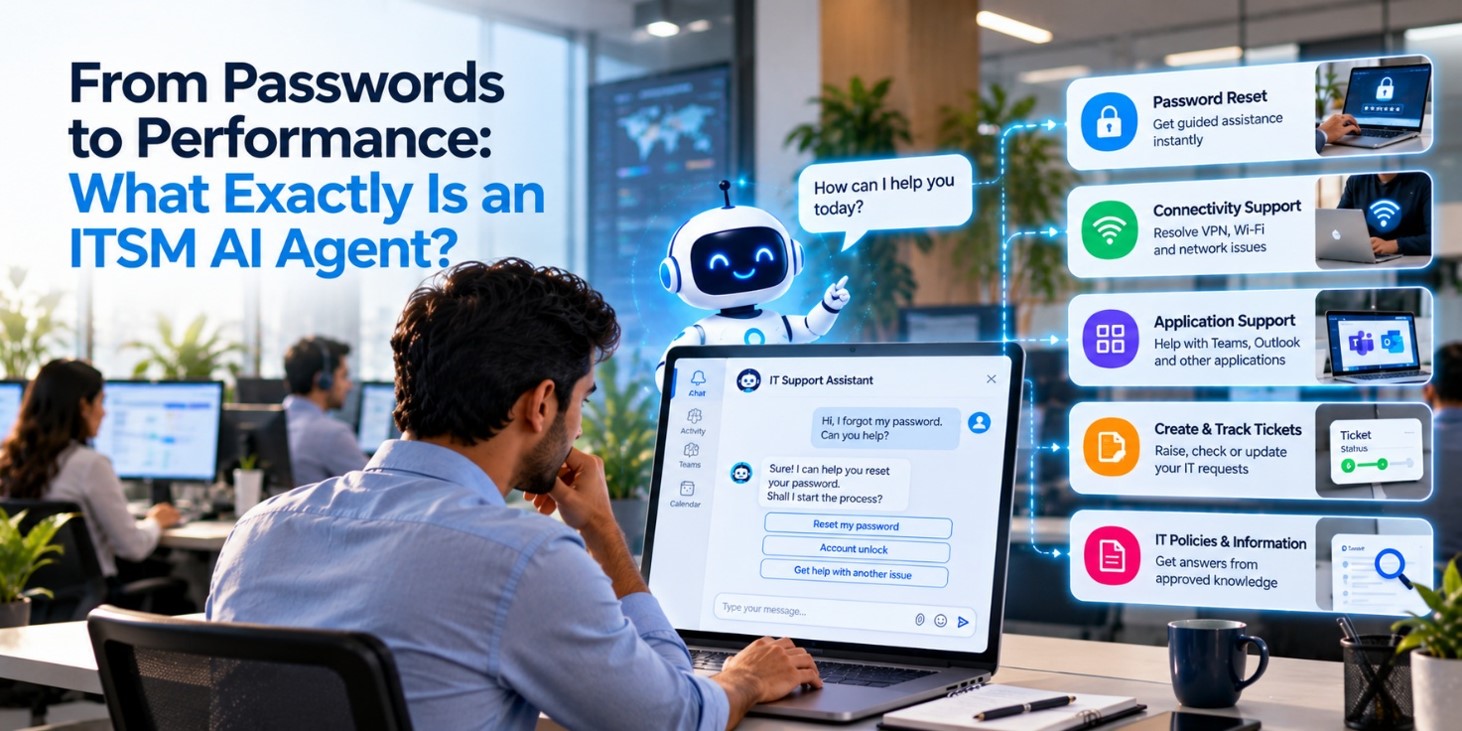
From Passwords to Performance: What Exactly Is an ITSM AI Agent?
From Passwords to Performance: What Exactly Is an ITSM AI Agent?
An ITSM AI Agent is a conversational digital assistant that helps employees solve common IT problems, request services, check tickets, and reach support teams without navigating multiple portals or waiting in email queues. Compusoft Advisors’ ITSM AI Agent is built using Microsoft Copilot Studio and can be published across Microsoft Teams, websites, intranets, internal portals, and mobile applications.compusoftadvisors
For Indian organisations managing thousands of employees, branches, devices, applications, and access requests, this means faster support, fewer repetitive tickets, and more productive IT teams.
What Is an ITSM AI Agent?
ITSM stands for IT Service Management—the processes used to deliver, manage, and support technology services inside an organisation.
An ITSM AI Agent adds a conversational layer to those processes. Employees can type or speak a request in natural language instead of searching a knowledge base, filling out a lengthy form, or sending an email to the helpdesk.
For example:
“I forgot my password.”
“My VPN is not connecting.”
“How do I request Microsoft 365 access?”
“What is the status of my laptop replacement ticket?”
The agent understands the request, searches approved organisational knowledge, guides the user through relevant steps, performs supported actions, or creates and routes a ticket when human intervention is required.
Microsoft describes Copilot Studio as a platform for creating and managing custom agents, workflows, and applications. Its IT support use cases include ticket intake, ticket creation, triage, and communication.microsoft
How Does It Work?
An ITSM AI Agent typically connects four important elements:
- Conversation: The employee explains the issue in everyday language.
- Knowledge: The agent retrieves answers from approved policies, FAQs, SOPs, runbooks, and Microsoft knowledge repositories.
- Actions: It can initiate workflows such as ticket creation, access requests, troubleshooting, and notifications.
- Escalation: If the issue requires specialist support, the agent transfers the case with the relevant context attached.
This removes the usual support friction. The employee does not need to repeat the same issue to three different people. The IT technician receives a structured request containing the incident description, urgency, impact, device details, service category, and troubleshooting already completed.
From Password Resets to Performance
Password resets are only the starting point. A well-designed agent can support the full frontline IT experience.
Common employee requests
- Password reset and access management.
- VPN, Wi-Fi, and connectivity troubleshooting.
- Microsoft Teams, Outlook, and application support.
- Software installation and approval requests.
- Device onboarding and setup guidance.
- IT policy and device usage questions.
- Asset and system information requests.
- Ticket creation, tracking, and status updates.
- Maintenance alerts and service interruption notifications.
The Compusoft Advisors solution is designed as a standalone AI agent using Microsoft Copilot Studio. It can be published across Teams, internal portals, websites, intranets, and mobile applications, giving employees one support interface across multiple devices and channels.compusoftadvisors
ITSM AI Agent vs Traditional Helpdesk
| Support activity | Traditional helpdesk | ITSM AI Agent |
|---|---|---|
| Password assistance | Employee emails or raises a portal request | Agent provides guided assistance and starts the approved workflow |
| Troubleshooting | Technician asks questions over several messages | Agent follows a structured diagnostic journey |
| Ticket creation | Employee manually completes a form | Agent captures issue context during the conversation |
| Ticket routing | Dispatcher reviews and assigns the ticket | Agent recommends or applies the relevant service category and route |
| Ticket tracking | Employee sends follow-up emails | Employee checks status through chat |
| Knowledge access | User searches documents or asks the helpdesk | Agent retrieves answers from approved sources |
| Escalation | Technician starts diagnosis from the beginning | Agent passes along symptoms, device details, and steps already tried |
| Notifications | Updates may be missed in email threads | Alerts can be delivered through connected channels |
The value is not simply “chatbot support.” The real benefit comes from connecting conversation with operational workflows.
Why Indian Organisations Need It
India’s enterprises often support distributed teams across Bengaluru, Mumbai, Delhi NCR, Hyderabad, Chennai, Pune, Kolkata, and smaller business locations. Employees may work from offices, homes, client sites, factories, campuses, or shared service centres.
That operating model creates recurring support pressure:
- Different teams use different applications and devices.
- Employees need help outside standard office hours.
- IT teams handle repetitive Level 1 questions.
- Remote users may struggle to describe technical issues accurately.
- Ticket queues grow when employees use email, chat, phone, and portals separately.
- Support teams need consistent processes across locations.
An ITSM AI Agent provides a single frontline interface. Employees receive standardised guidance, while IT teams spend less time answering the same password, VPN, software, and access questions.
For companies with multilingual and geographically distributed workforces, deployment across familiar channels such as Microsoft Teams, web portals, and mobile interfaces can also reduce adoption barriers.
Guided Troubleshooting, Not Guesswork
A useful ITSM AI Agent does more than display a list of generic fixes.
It can ask targeted questions:
- Which device are you using?
- Are you connected to the office network or home Wi-Fi?
- What error message appears?
- When did the issue begin?
- Have you restarted the application or device?
- Does the problem affect only you or other users too?
The agent then adapts the next step based on the employee’s response. It may recommend restarting a service, updating an application, switching networks, or retrying after a known outage.
It can also verify the result before closing the interaction. If the problem remains unresolved, the agent escalates it with a clearer technical record.
Ticket Automation Without Repetition
Traditional ticket forms often ask employees to enter information they may not understand. They may choose the wrong category, omit the business impact, or write a description such as “system not working.”
An ITSM AI Agent collects those details conversationally. It can identify:
- The affected service.
- The user’s device or application.
- Business urgency.
- Number of affected users.
- Error messages.
- Troubleshooting already attempted.
- Relevant department or location.
The result is a better-quality ticket and less back-and-forth between the employee and the service desk.
The agent can also allow employees to retrieve current and past tickets through conversation, while pushing updates, maintenance alerts, and resolution notifications through connected channels.compusoftadvisors
Security and Governance Matter
An AI agent should not be allowed to invent policies, expose sensitive information, or approve every request automatically.
Organisations should configure:
- Role-based access.
- Approved knowledge sources.
- Identity verification for sensitive actions.
- Human approval for access and software requests.
- Audit visibility for conversations and workflows.
- Clear escalation rules.
- Data retention and security controls.
- Testing for inaccurate or unsafe responses.
Microsoft’s IT helpdesk scenario supports actions such as answering internal policy questions, checking ticket status, creating helpdesk tickets, and transferring conversations to a human when the agent cannot resolve the issue.adoption.microsoft
The safest approach is to let the agent automate routine, well-defined tasks while routing exceptions and high-risk actions to authorised IT staff.
Business Benefits
When implemented with the right integrations and governance, an ITSM AI Agent can help organisations:
- Reduce repetitive Level 1 support work.
- Shorten response and resolution times.
- Improve the quality of ticket information.
- Give employees support outside normal helpdesk hours.
- Standardise troubleshooting across locations.
- Reduce follow-up emails and portal switching.
- Improve visibility into recurring IT problems.
- Free technicians to focus on incidents, security, infrastructure, and projects.
The performance improvement comes from removing small delays that accumulate throughout the day. A five-minute password issue multiplied across hundreds of employees becomes a significant productivity cost.
Where Compusoft Advisors Fits
Compusoft Advisors’ ITSM AI Agent is built on Microsoft Copilot Studio and is positioned as a digital first line of IT support. It supports conversational troubleshooting, service requests, ticket automation, routing, tracking, and notifications.marketplace.microsoft+1
Because the agent can be deployed through Microsoft Teams, internal portals, websites, intranets, and mobile applications, organisations can place support where employees already work instead of forcing them to learn another interface.
For an IT leader, the practical question is not whether an AI agent can answer a password query. It is whether the agent can connect that answer to secure workflows, reliable knowledge, measurable service outcomes, and human escalation.
That is where an ITSM AI Agent moves from a simple chatbot to an operational support system.
Ready to Modernise IT Support?
Start with high-volume, low-risk use cases such as password assistance, VPN troubleshooting, software requests, ticket status, and policy questions. Then connect the agent to your existing ITSM processes and expand based on measurable results.
Speak with Compusoft Advisors to assess how an ITSM AI Agent can fit your Microsoft environment, support channels, knowledge sources, and service desk workflows.
Recent Post
-
 10 Oct 2026Boosting Enterprise Efficiency: Integrating an AI Agent Document Analyzer Into Microsoft Teams
 -
 07 Oct 2026From Passwords to Performance: What Exactly Is an ITSM AI Agent?
 -
 05 Oct 20265 Common HR Bottlenecks That an HRMS AI Agent Can Solve Instantly
 -
 01 Oct 2026Beyond Generic AI: Building Custom Business Agents with Microsoft Copilot Studio
 -
 25 Sep 2026Driving Business Growth and Lead Qualification with AI-Powered Assistants
 -
 23 Sep 2026From Discussion to Delivery: How AI Meeting Assistants Eliminate the Post-Meeting Execution Gap
Grow Your Business Today
Aggarwal Estate, Chitalsar Manpada, S V Road, Thane 400 610
Microsoft Solution Partner
Quick Link